AI search engines work differently than Google Search.
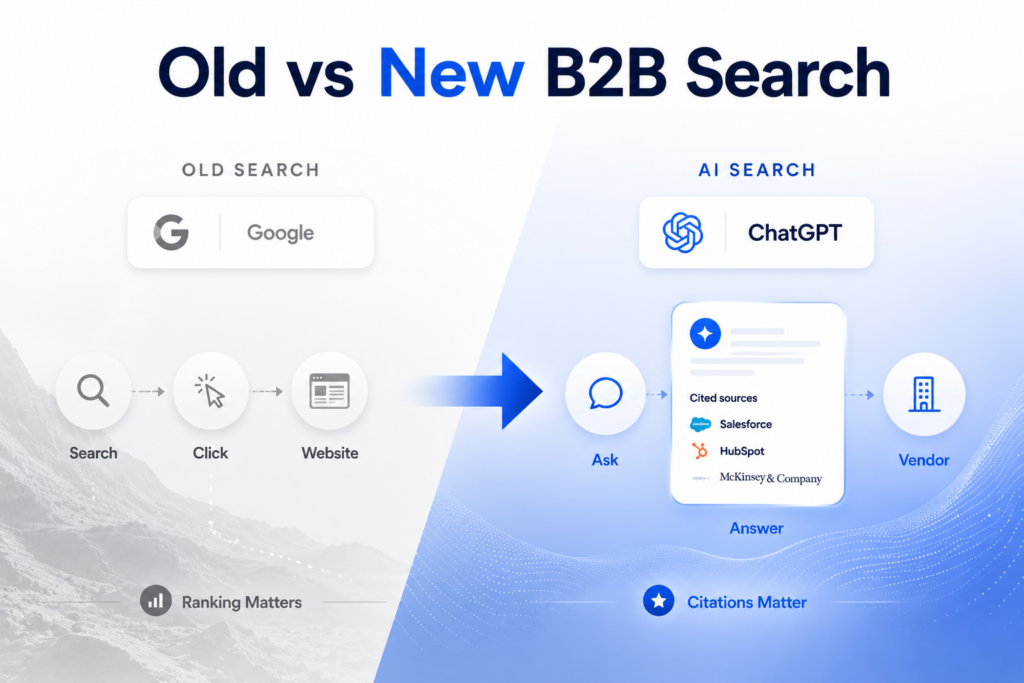
Google Search reads your content as narrative. It crawls links. It measures page authority.
AI search engines (ChatGPT, Perplexity, Claude) read data first, then narrative.
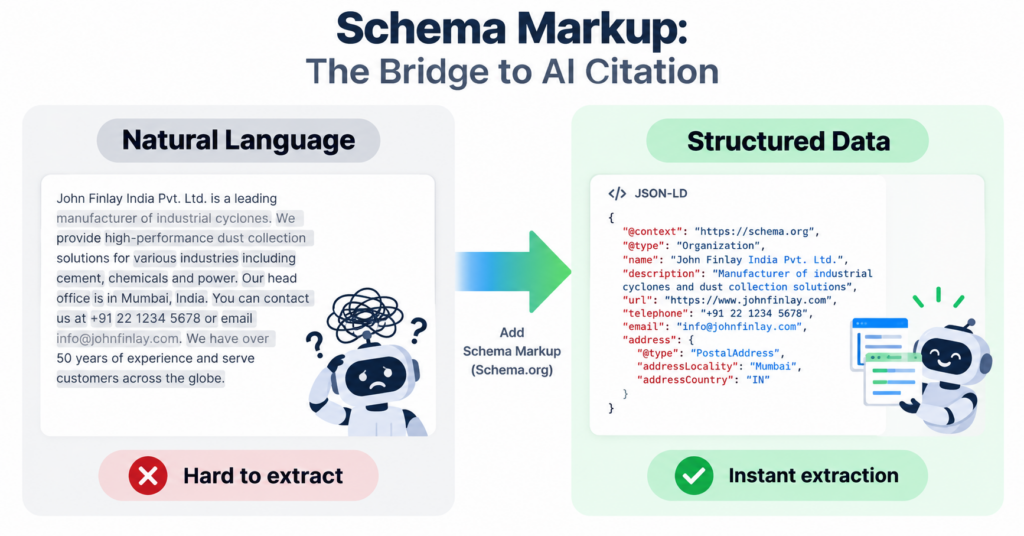
They look for structured data, schema markup, to quickly understand what your content is about.
No schema markup? Your content is harder to extract. Harder to extract = less likely to be cited.
Schema markup is the bridge between “your website has good content” and “AI engines will cite your content.”
Here’s the 5 schemas every B2B brand needs, and how to implement them without a developer.
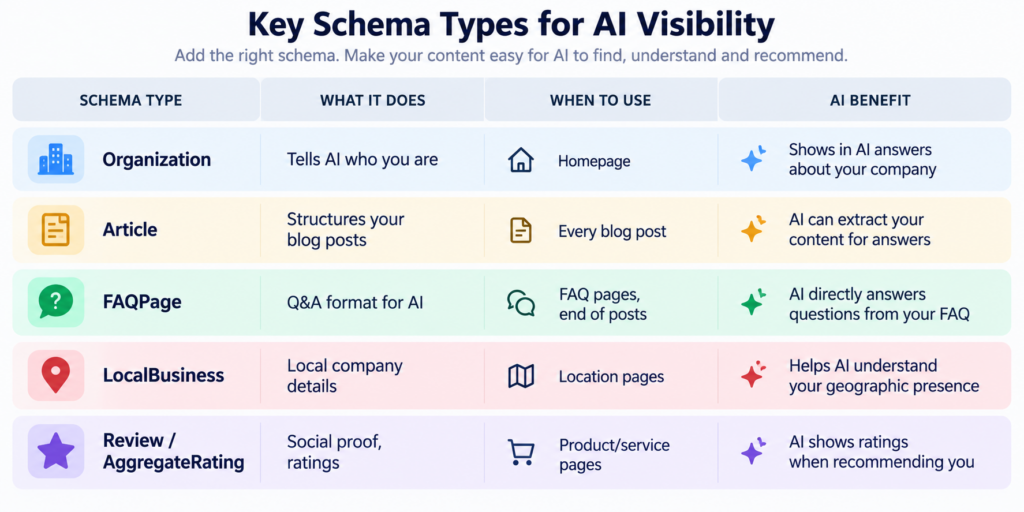
Quick Reference (Table)
Why Schema Markup Matters for AI Search (Not Google Search)
First, let’s separate the two.
Google Search reads all your content, follows links, measures domain authority, and ranks you based on relevance + authority.
Schema markup helps Google understand your content faster, but Google doesn’t require it.
AI Search is different.
When ChatGPT generates an answer, it needs to:
- Find relevant sources
- Extract specific information
- Cite those sources
Schema markup is the Rosetta Stone for step 2. It tells AI engines exactly where the information is.
Without schema markup, AI engines have to parse your entire website in natural language. With schema markup, they can extract structured information instantly.
Example:
Without schema: AI reads “Our company is based in Bangalore and we’ve built ₹40M+ pipeline for 100+ customers”
With schema (Organization + AggregateRating): AI immediately knows → Company location: Bangalore. Customers: 100+. Pipeline: ₹40M+. Rating: 4.8/5
The second takes microseconds. The first takes computation and is error-prone.
For citation:
When AI answers a buyer’s question (“Who is the leading B2B demand gen agency in India?”), it needs to cite you.
Schema markup makes citation easier. Your structured data becomes the citation.
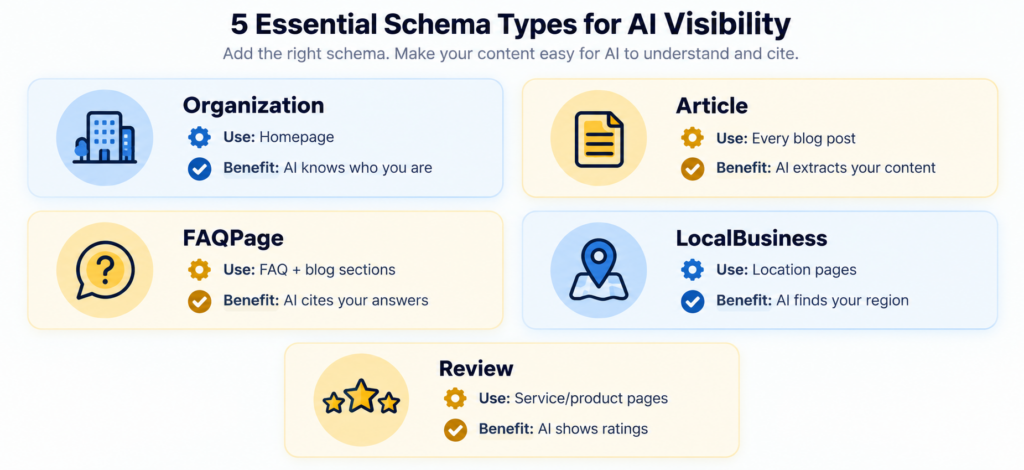
The 5 Schemas Every B2B Brand Needs
Schema 1: Organization Schema
What it does: Tells AI who your company is, where you’re based, and your key details.
Where to put it: Homepage (one per domain)
What to include:
- Company name
- Company description
- Logo
- Address (HQ location)
- Phone number
- Website URL
- Social profiles (LinkedIn, Twitter)
- Number of employees (if public)
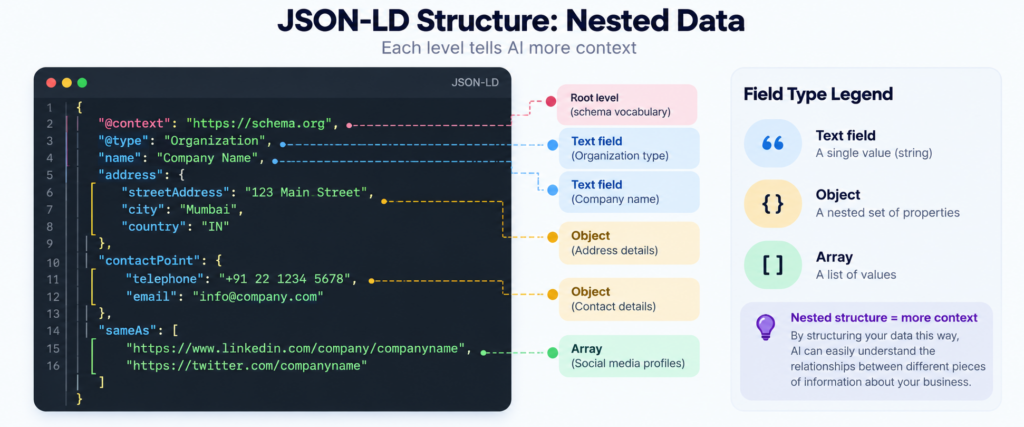
Example JSON-LD (copy-paste ready):
- {
- “@context”: “https://schema.org”,
- “@type”: “Organization”,
- “name”: “Amplio Luma”,
- “url”: “https://amplio.digital”,
- “logo”: “https://amplio.digital/logo.png”,
- “description”: “Fractional CMO agency helping B2B SaaS companies build ₹40M+ pipeline.”,
- “foundingDate”: “2022”,
- “numberOfEmployees”: “12”,
- “address”: {
- “@type”: “PostalAddress”,
- “streetAddress”: “123 Tech Park”,
- “addressLocality”: “Bangalore”,
- “addressRegion”: “Karnataka”,
- “postalCode”: “560001”,
- “addressCountry”: “IN”
- },
- “contactPoint”: {
- “@type”: “ContactPoint”,
- “contactType”: “Sales”,
- “telephone”: “+91-XXXXXX”,
- “email”: “hello@amplio.digital”
- },
- “sameAs”: [
- “https://linkedin.com/company/amplio-luma”,
- “https://twitter.com/amplio”
- ]
- }
Why AI cares: When someone asks ChatGPT “Tell me about Amplio Luma,” your Organization schema gives immediate context.
Schema 2: Article Schema
What it does: Structures your blog posts so AI can extract metadata and content.
Where to put it: Every blog post
What to include:
- Article title
- Article description (headline)
- Author name
- Date published
- Date modified
- Article body (the full content)
- Featured image
- mainEntityOfPage (URL of the article)
- author.url (author’s profile URL)
Example JSON-LD:
- {
- “@context”: “https://schema.org”,
- “@type”: “Article”,
- “headline”: “How to Build a B2B Demand Generation Engine from Scratch”,
- “description”: “Complete guide to building a demand gen system in 90 days without a ₹5Cr budget.”,
- “image”: “https://amplio.digital/blog/demand-gen-engine.jpg”,
- “mainEntityOfPage”: {
- “@type”: “WebPage”,
- “@id”: “https://amplio.digital/blog/demand-gen-engine”
- },
- “author”: {
- “@type”: “Person”,
- “name”: “Amish Keshwani”,
- “url”: “https://amplio.digital/about/amish-keshwani”
- },
- “datePublished”: “2026-08-18”,
- “dateModified”: “2026-08-20”,
- “articleBody”: “Most demand generation advice is written for enterprise companies…”,
- “publisher”: {
- “@type”: “Organization”,
- “name”: “Amplio Luma”,
- “logo”: {
- “@type”: “ImageObject”,
- “url”: “https://amplio.digital/logo.png”
- }
- }
- }
Why AI cares: When an AI engine extracts your blog post for an answer, Article schema gives it structured metadata. It knows the author, the date, the description immediately.
Schema 3: FAQPage Schema
What it does: Structures Q&A content for AI extraction.
Where to put it: FAQ pages, end of detailed blog posts, Q&A sections
Important note: Google restricted FAQPage rich results to government and health sites in 2023. B2B brands will not get rich snippet display in Google Search. However, AI search engines (ChatGPT, Perplexity, Claude) still use FAQPage schema for direct extraction and citation. Use this schema if your goal is AI extraction, not Google SERP display.
What to include:
- Questions (as text)
- Answers (as text)
Example JSON-LD:
- {
- “@context”: “https://schema.org”,
- “@type”: “FAQPage”,
- “mainEntity”: [
- {
- “@type”: “Question”,
- “name”: “What is a demand gen engine?”,
- “acceptedAnswer”: {
- “@type”: “Answer”,
- “text”: “A demand gen engine is a repeatable system connecting awareness, authority, lead generation, and revenue activities into one flow.”
- }
- },
- {
- “@type”: “Question”,
- “name”: “How long does it take to build?”,
- “acceptedAnswer”: {
- “@type”: “Answer”,
- “text”: “6-8 months with internal teams. 4-6 months with guided implementation and proven playbooks.”
- }
- }
- ]
- }
Why AI cares: When someone asks an AI a question, the AI looks for FAQPage schema as a direct source. Your Q&A structure makes it easy to cite you.
Schema 4: LocalBusiness Schema
What it does: Marks your company as a local business (if you have a physical location or serve specific regions).
Where to put it: Location/contact pages, if you have regional offices
What to include:
- Business name
- Address
- Service area (regions you serve)
- Phone
- Hours of operation (if applicable)
- Geographic coordinates
Example JSON-LD (CORRECTED):
- {
- “@context”: “https://schema.org”,
- “@type”: “LocalBusiness”,
- “name”: “Amplio Luma – India”,
- “image”: “https://amplio.digital/logo.png”,
- “address”: {
- “@type”: “PostalAddress”,
- “streetAddress”: “123 Tech Park”,
- “addressLocality”: “Bangalore”,
- “postalCode”: “560001”,
- “addressCountry”: “IN”
- },
- “geo”: {
- “@type”: “GeoCoordinates”,
- “latitude”: “12.9716”,
- “longitude”: “77.5946”
- },
- “areaServed”: [“IN”, “AE”, “SA”],
- “telephone”: “+91-XXXXXX”
- }
Note: GeoCoordinates uses numeric latitude/longitude (not degree symbols). This is the correct format for AI extraction.
Why AI cares: When a buyer in India asks ChatGPT “Who are the best B2B agencies in India?”, LocalBusiness schema helps AI understand your geographic presence.
Schema 5: Review / AggregateRating Schema
What it does: Adds social proof and ratings to your content.
Where to put it: Product/service pages, testimonial sections, case studies
What to include:
- Product/service name
- Rating (1-5 stars)
- Number of reviews
- Review text (if individual reviews)
Example JSON-LD (AggregateRating):
- {
- “@context”: “https://schema.org”,
- “@type”: “Service”,
- “name”: “Fractional CMO Services”,
- “provider”: {
- “@type”: “Organization”,
- “name”: “Amplio Luma”
- },
- “aggregateRating”: {
- “@type”: “AggregateRating”,
- “ratingValue”: “4.8”,
- “ratingCount”: “47”,
- “bestRating”: “5”,
- “worstRating”: “1”
- }
- }
Why AI cares: When AI recommends your service, it can cite social proof. “Rated 4.8/5 by 47 customers” becomes part of the answer.
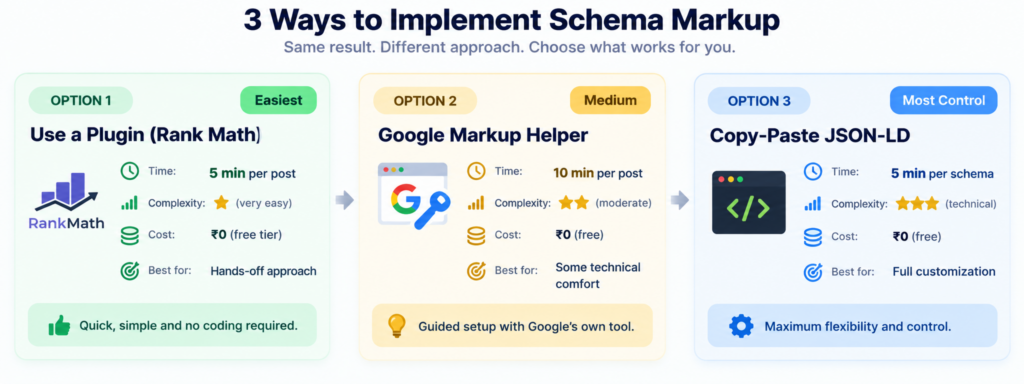
How to Add Schema to Your WordPress Site (No Developer Needed)
Option 1: Use a Plugin (Easiest)
Plugins like Yoast SEO, Rank Math, or Schema Pro add schema automatically.
Steps:
- Install Rank Math (free tier has schema)
- Go to each post/page
- Scroll to Rank Math section
- Add schema from the dropdown
- Fill in the fields (AI will auto-fill most)
- Publish
Time: 5 minutes per post
Option 2: Use Google’s Rich Results Test + Schema.org Validator
Google has been sunsetting their Structured Data Markup Helper. Instead:
- Go to https://validator.schema.org/ to validate your schema
- Use https://search.google.com/test/rich-results to test rich result eligibility
- These tools are more reliable and will remain current
Time: 10 minutes per post
Option 3: Copy-Paste from Template (What We Provided Above)
Take the JSON-LD examples above, fill in your details, and add to your WordPress theme header or use a plugin like “Insert Headers and Footers”
Time: 5 minutes per schema
The 4 Key Rules for Schema That AI Actually Extracts
Rule 1: Use JSON-LD, Not Microdata
There are multiple ways to add schema (JSON-LD, Microdata, RDFa). JSON-LD is the standard AI engine.
Rule 2: Accuracy Matters
If your schema says “Founded 2022” but your website says “Founded 2020”, AI will notice the discrepancy and trust you less.
Keep the schema in sync with your actual content.
Rule 3: Complete Your Schema Fields
Schema with 3 fields is barely useful. Schema with 8 fields (description, image, author, date, keywords, etc.) is extractable.
Fill out all available fields.
Rule 4: Update Your Schema When Content Changes
If you update a blog post, update the dateModified in Article schema.
If you move offices, update LocalBusiness schema.
Schema gets stale. Keep it fresh.
How to Measure If Your Schema Is Working
Step 1: Check if schema is valid
Go to Google’s Rich Results Test (https://search.google.com/test/rich-results)
Paste your URL. It will show you what schema it detects and if it’s valid.
Step 2: Check if AI engines are using it
Go to ChatGPT / Perplexity / Claude
Search for your brand or your content
See if your schema appears in citations
Example: “Amplio Luma, rated 4.8/5 with 47 reviews” → Your Review schema is being used
Step 3: Monitor over 3 months
Schema impact takes time. Keep track of:
- How often your brand appears in AI answers
- How often you’re cited
- Whether ratings/reviews appear in citations
Adjust and improve.
Common Mistakes That Kill Schema Effectiveness
Mistake 1: Schema doesn’t match content
You have a schema saying “5-star rating” but your website has no reviews. AI notices inconsistency.
Mistake 2: Only schema, no AI-extractable content
You add Article schema to a blog post written entirely in narrative prose with no headers, lists, or answer capsules.
AI can’t extract the actual information to cite you.
Mistake 3: Schema on the wrong pages
You add a FAQPage schema on a page with no actual questions. AI won’t use it.
Mistake 4: Not checking validity
You add schema. You don’t test it. Half your schema is malformed. AI can’t parse it.
Always validate schema with validator.schema.org
Mistake 5: Forgetting to update
You add a schema once in 2023. It’s now 2026. Your company info is outdated. AI is citing old information.
AI search visibility isn’t just content strategy—it’s technical + strategic. Let’s audit your schema and optimize for AI citations.
Schedule your AI audit →